A website can have great content and a professional design but still struggle in Google Search if search engines cannot properly crawl, understand, or index it.
That is why technical SEO matters.
Technical SEO focuses on the behind-the-scenes parts of a website that affect search engine accessibility, indexing, performance, site structure, and user experience. Google Search Console provides tools such as URL Inspection and Page Indexing reports that can help website owners identify crawling and indexing problems.
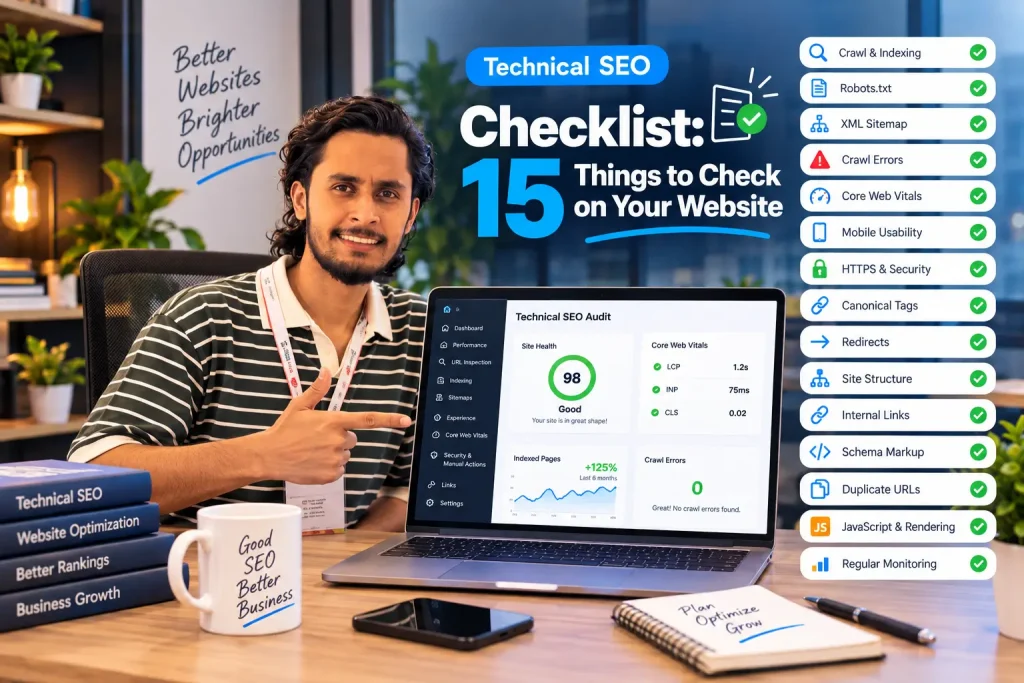
If you are auditing a business website, ecommerce store, WordPress website, or Shopify store, this Technical SEO Checklist gives you 15 important areas to review.
What Is Technical SEO?
Technical SEO is the process of improving the technical foundation of a website so that search engines can efficiently crawl, understand, and index its important pages.
It can include:
- Crawling and indexing
- Website architecture
- Page speed
- Core Web Vitals
- Mobile usability
- HTTPS
- XML sitemaps
- Robots.txt
- Canonical URLs
- Redirects
- Structured data
- Internal linking
- JavaScript rendering
- Duplicate URLs
- International SEO implementation
Technical SEO does not guarantee higher rankings by itself. Instead, it helps remove technical obstacles and creates a stronger foundation for your content and other SEO efforts.
Technical SEO Checklist: 15 Things to Check
1. Check Whether Important Pages Are Indexed
Start by checking whether Google has indexed the pages that actually matter to your business.
Your important pages may include:
- Homepage
- Service pages
- Product pages
- Category pages
- Location pages
- Important blog posts
- Contact and other supporting pages
Google’s Page Indexing report shows which pages Google has indexed and which pages are not indexed, along with reasons for many exclusions.
What to check
Look for important pages marked as:
- Not indexed
- Crawled but currently not indexed
- Discovered but currently not indexed
- Blocked by robots.txt
- Excluded by
noindex
Do not assume that every “not indexed” URL is a problem. Some pages, such as duplicate or low-value URLs, may intentionally be excluded.
Action: Use Google Search Console’s URL Inspection tool to investigate important URLs individually.
2. Check Your Robots.txt File
The robots.txt file provides crawling instructions to search engine crawlers.
A poorly configured robots.txt file can accidentally prevent crawlers from accessing important areas of your website.
Check:
yourdomain.com/robots.txt
Look for rules that may unintentionally block important sections.
For example, if an important directory containing product or service pages is blocked, search engines may have difficulty accessing those URLs.
Important distinction
A robots.txt rule controls crawling. It is not the same as a noindex directive.
Google’s documentation specifically recommends checking whether crawling is allowed and whether indexing is allowed when troubleshooting a URL.
3. Review Your XML Sitemap
Your XML sitemap helps search engines discover URLs that you consider important.
Check that your sitemap:
- Loads correctly
- Contains canonical URLs
- Includes important indexable pages
- Does not contain unnecessary URLs
- Does not contain broken URLs
- Is submitted in Google Search Console
For larger websites, sitemaps can be particularly useful for helping Google discover URLs and monitor indexing. Google also provides a Sitemaps report in Search Console.
Quick check
Open:
yourdomain.com/sitemap.xml
The exact sitemap URL can vary depending on your CMS or SEO setup.
4. Find and Fix Crawl Errors
Crawl errors occur when search engine crawlers encounter problems accessing URLs.
Common examples include:
- 404 errors
- Server errors
- Redirect problems
- Blocked resources
- DNS or hosting issues
- Incorrect robots.txt rules
A few isolated 404 pages are not automatically an SEO disaster. Problems become more important when valuable pages are consistently returning errors or important internal links point to broken URLs.
What to do
Use Google Search Console and a technical crawling tool to identify important errors.
Then determine whether the URL should be:
- Restored
- Redirected
- Corrected
- Removed
- Intentionally left unavailable
5. Check Core Web Vitals and Page Speed
Website performance affects both user experience and how effectively visitors can interact with your site.
Google’s page experience guidance recommends paying attention to Core Web Vitals alongside other aspects such as HTTPS, mobile usability, and intrusive interstitials.
The current Core Web Vitals focus on:
- LCP — Largest Contentful Paint
- INP — Interaction to Next Paint
- CLS — Cumulative Layout Shift
Don’t optimize a website simply because a speed tool produces a particular score.
Look at real performance data, identify the actual bottlenecks, and improve the experience users are having.
Common improvements include:
- Compressing images
- Using modern image formats
- Reducing unnecessary JavaScript
- Improving server response time
- Removing unused resources
- Optimizing fonts
- Using caching appropriately
6. Make Sure Your Website Works Well on Mobile
Most modern websites receive significant traffic from mobile users.
Your website should be easy to use on smaller screens without:
- Horizontal scrolling
- Tiny text
- Overlapping elements
- Broken menus
- Difficult forms
- Unusable buttons
- Content hidden behind interactive elements
Google’s page experience guidance explicitly includes mobile usability as part of evaluating the overall experience of a website.
Test important pages on:
- Smartphones
- Tablets
- Different browsers
- Different screen sizes
Don’t only check the homepage. Test your important landing pages, product pages, forms, and navigation.
7. Check HTTPS and Website Security
Your website should use HTTPS correctly.
Check that:
- HTTP redirects to HTTPS
- HTTPS pages load correctly
- There are no unnecessary mixed-content problems
- Your preferred URL consistently uses HTTPS
- Internal links use the correct secure version
Security is also part of a broader website quality and user experience assessment.
If your website handles forms, payments, accounts, or sensitive customer information, security should be treated as a business priority—not simply an SEO task.
8. Review Canonical Tags
Canonical tags help communicate which URL should be treated as the preferred version when multiple URLs contain similar or duplicate content.
This can become especially important for:
- Ecommerce websites
- Filtered URLs
- Parameter URLs
- Product variations
- Pagination
- Content available under multiple URLs
Check whether:
- Important pages have appropriate canonical URLs
- Canonicals point to valid URLs
- Canonicals are not accidentally pointing to unrelated pages
- Non-canonical duplicate URLs are handled appropriately
Google Search Console’s URL Inspection tool can show the canonical information Google has associated with a URL.
9. Check Redirects
Redirects are an important part of technical SEO, particularly during website migrations, URL changes, and redesigns.
Check for:
- Broken redirects
- Redirect chains
- Redirect loops
- Incorrect destination URLs
- Internal links pointing to redirected URLs
For permanent URL changes, use the appropriate permanent redirect rather than creating complicated chains.
Example
Instead of:
old-page → page-1 → page-2 → final-page
Aim for:
old-page → final-page
This keeps the path simpler for both users and crawlers.
10. Improve Your Website Architecture
A strong website structure helps users and search engines understand how your content is organized.
For example:
Homepage → Service → Sub-service → Supporting Content
A local business might use:
Homepage → Services → Local SEO → Local SEO for Restaurants
An ecommerce store might use:
Homepage → Category → Subcategory → Product
Your most important pages should be accessible through logical navigation and internal links.
Google notes that pages that are not linked from other accessible pages can be difficult for Google to discover.
11. Audit Internal Links
Internal links connect pages within your own website.
They can help users discover related content and help search engines understand relationships between pages.
Check for:
- Broken internal links
- Orphan pages
- Excessive links
- Irrelevant anchor text
- Important pages with very few internal links
- Important pages buried too deeply in the site
Example
If you publish an article about Technical SEO Audits, it could naturally link to your Technical SEO service page.
Likewise, a blog post about Google Maps visibility could link to your Local SEO service.
The link should make sense to the reader first.
12. Check Structured Data and Schema Markup
Structured data provides standardized information that can help Google understand the content of a page.
Google explains that structured data can help it understand page content and potentially make pages eligible for certain search features when the relevant requirements are met.
Depending on your website, relevant structured data may include:
- Organization
- LocalBusiness
- Product
- Article
- Breadcrumb
- Service
- Person
However, don’t add schema simply because it exists.
The markup should accurately represent the visible content and follow Google’s structured-data guidelines. Google recommends validating structured data and checking how Google sees the page.
13. Check Duplicate and Thin URLs
Large websites can unintentionally create many URLs with little unique value.
This is common with:
- Ecommerce filters
- Search result pages
- URL parameters
- Product variations
- Tag archives
- Duplicate categories
- Printer-friendly pages
Review whether these URLs need to be:
- Indexed
- Canonicalized
- Redirected
- Blocked from crawling where appropriate
- Removed
The goal is not to force every URL into Google’s index.
The goal is to make sure Google can focus on the pages that provide genuine value.
14. Check JavaScript and Rendering Issues
Modern websites often depend heavily on JavaScript.
If important content or links are only available after JavaScript executes, make sure search engines can properly access and render the page.
This is particularly important for:
- JavaScript-heavy websites
- React applications
- Vue applications
- Dynamic ecommerce stores
- Interactive filters
- Client-side navigation
Google Search Console’s URL Inspection tool can provide information about the HTML and resources Google retrieved when processing a page.
Practical check
Compare:
What users see
with
What search engines can access and understand
If important content disappears when JavaScript is disabled or fails to load, investigate it.
15. Check Your Site After Major Changes
Technical SEO should not be a one-time project.
A redesign, migration, plugin update, theme change, URL restructuring, or major content update can introduce new technical problems.
After a significant change, check:
- Important URLs
- Indexing
- Redirects
- Sitemap
- Robots.txt
- Canonicals
- Internal links
- Structured data
- Page speed
- Mobile experience
- Search Console errors
Google recommends using Search Console to monitor indexing and performance, and the URL Inspection tool can be used to troubleshoot individual URLs after changes.
Technical SEO Checklist at a Glance
| # | Technical SEO Check | What to Look For |
|---|---|---|
| 1 | Indexing | Important pages indexed |
| 2 | Robots.txt | Important content not accidentally blocked |
| 3 | XML Sitemap | Clean, accessible sitemap |
| 4 | Crawl Errors | 404s, server errors, crawl problems |
| 5 | Core Web Vitals | LCP, INP, CLS and real user experience |
| 6 | Mobile | Responsive and usable pages |
| 7 | HTTPS | Secure and consistent URLs |
| 8 | Canonicals | Correct preferred URLs |
| 9 | Redirects | No unnecessary chains or loops |
| 10 | Site Architecture | Logical hierarchy |
| 11 | Internal Links | Strong connections between important pages |
| 12 | Schema | Accurate structured data |
| 13 | Duplicate URLs | Properly managed duplicates |
| 14 | JavaScript | Important content accessible to search engines |
| 15 | Ongoing Monitoring | Regular technical checks |
How Often Should You Perform a Technical SEO Audit?
There is no single schedule that works for every website.
A small business website with few changes may need less frequent deep audits, while a large ecommerce website, news site, or frequently updated website may require more regular monitoring.
At a minimum, review your technical SEO when you:
- Launch a new website
- Change your domain
- Redesign your website
- Change your CMS
- Change your URL structure
- Install major plugins or apps
- Add thousands of pages
- Experience a sudden organic traffic drop
Google recommends monitoring Search Console reports for issues and checking indexing after significant changes.
Technical SEO Is About More Than Fixing Errors
A common misconception is that technical SEO simply means fixing errors in an SEO tool.
That’s only part of the work.
A technically strong website should also have:
Clear architecture + accessible pages + efficient crawling + good performance + usable mobile experience + accurate structured data + strong internal linking.
The technical foundation should support the content and business strategy rather than exist separately from them.
For example, publishing 100 excellent blog posts won’t help as much if important pages cannot be discovered or indexed properly.
Likewise, fixing every technical warning won’t automatically make weak content rank.
Technical SEO works best as part of a broader SEO strategy.
How Azim Jamshed Approaches Technical SEO
Technical SEO requires looking at how different parts of a website work together.
Azim Jamshed, an SEO Expert in Bangladesh, helps businesses identify technical SEO problems and improve the foundations that support organic search visibility.
His approach can include technical audits, crawl and indexing analysis, website structure, page performance, internal linking, schema implementation, and SEO-friendly website optimization.
For businesses that need a deeper technical review, you can explore the Technical SEO services available through SEO Expert Azim.
The objective is not simply to produce an audit full of warnings. It is to identify the issues that matter, prioritize them, and turn the findings into practical improvements.
Frequently Asked Questions
What is a technical SEO checklist?
A technical SEO checklist is a structured set of checks used to identify issues affecting a website’s crawlability, indexability, performance, architecture, security, and search-engine accessibility.
What is the most important part of technical SEO?
There isn’t one single issue that matters for every website. Start with the fundamentals: make sure important pages are accessible, indexable, internally linked, technically sound, and usable.
How can I check if Google has indexed my website?
Google Search Console’s Page Indexing report provides an overview of indexed and non-indexed URLs. For an individual page, use the URL Inspection tool.
Does website speed affect SEO?
Website performance contributes to page experience, and Core Web Vitals are part of Google’s page experience guidance. However, speed should be considered alongside content relevance, accessibility, mobile usability, security, and other aspects of the overall experience.
Do I need schema markup on every page?
No. Structured data should be relevant to the page and accurately represent its content. Adding unnecessary or inaccurate schema is not a substitute for good SEO.
How often should I perform a technical SEO audit?
The appropriate frequency depends on the website. A major redesign, migration, CMS change, or significant technical update is a good reason to perform a fresh audit.
Final Thoughts
A strong technical foundation makes it easier for search engines to access and understand your website while giving users a better experience.
Use this Technical SEO Checklist as a starting point, but don’t treat every warning as equally important. Prioritize problems that affect important pages, crawling, indexing, performance, usability, and the overall structure of your website.
If you are unsure where your technical SEO problems are coming from, a professional audit can help you identify the issues and determine what should be fixed first.
🚀 Need Help With Technical SEO?
Your website may have SEO problems that aren’t obvious from the front end.
Azim Jamshed helps businesses identify technical SEO issues, improve website foundations, and build search-friendly websites designed around real business goals.
If you want to understand what’s holding your website back, start with a proper technical SEO review.